
The Problem: Closed Shadow DOM
When testing iFrames with Playwright (which, unlike Cypress, has excellent iframe support), you may encounter a particularly tricky scenario: the closed Shadow DOM. In your browser's DevTools, it looks like this:
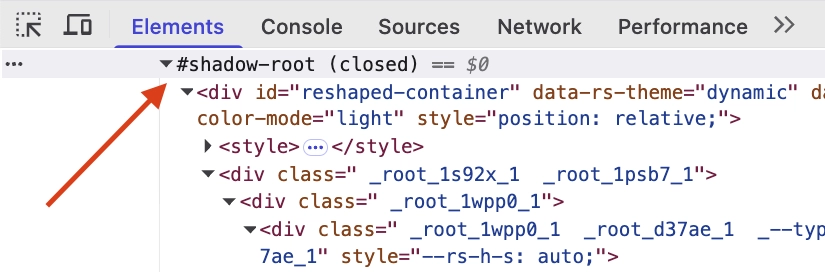
Notice the #shadow-root (closed) label.
A common place to hit this combination is embedded third-party widgets (payment fields, identity-verification flows) that render inside an iframe and keep their internals in a closed shadow root.
Why Shadow DOM is Closed
The Shadow DOM provides encapsulation for web components, isolating their internal structure from the rest of the page. When a Shadow DOM is set to closed mode, it's mostly about encapsulation:
- Isolation: makes it harder for page scripts to reach into or tamper with the component's internals. It's a deterrent rather than a security boundary: any script that runs first can patch
attachShadow, which is exactly what the trick below does. - Encapsulation: ensures component internals remain private and protected from outside interference
- API contract: forces interaction through the component's public API only
While these are valid architectural decisions, they create a challenge for automated testing where you need to verify the component's internal state.
The Testing Challenge
When you try to use Playwright to interact with elements inside a closed Shadow DOM, you'll encounter errors because Playwright cannot pierce through the closed boundary. The DOM query simply fails to find the elements you're looking for.
For most test engineers, this seems like game over. However, there's a clever workaround.
The Solution: Force Open Shadow DOM
You can intercept the Shadow DOM creation at the browser level and force all Shadow DOMs to be created in open mode instead:
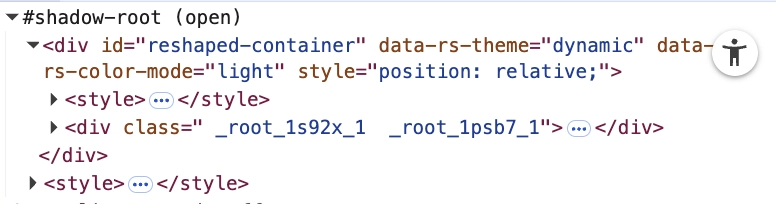
Notice the difference: #shadow-root (open) allows Playwright to access the internal elements.
Implementation
This is the function that does it:
This function uses Playwright's addInitScript() to inject JavaScript that runs before any page scripts load. It:
- Saves the original
attachShadowmethod - Overrides
Element.prototype.attachShadow - Intercepts all Shadow DOM creation calls
- Forces the mode to
'open'regardless of what the component requests - Keeps all other initialization options
Usage in Tests
Add this to your test setup to apply it to all tests:
Alternatively, for specific tests:
Inside an iframe
addInitScript() runs in child frames as well as the top-level page. Playwright evaluates it whenever a child frame is attached or navigated, in the context of that frame, so one call covers the iframe too. Combine it with frameLocator():
Important Considerations
- Test environment only: this technique should only be used in testing environments. It fundamentally changes how the application behaves.
- Timing matters: call
forceOpenShadowDOM()before navigating to your page, as it needs to inject the script before the page loads. - iFrame support: this works within iFrames as well, which is what you need for embedded components.
- Declarative Shadow DOM isn't covered: a shadow root declared in HTML with
<template shadowrootmode="closed">is created by the HTML parser, not by callingattachShadow(), so this override never sees it and the root stays closed.
goto().This approach gives you the testing capability you need while respecting that closed Shadow DOM serves legitimate purposes in production code.